How to Check Windows 11 Build Number in 2025 – 4 Proven Methods (24H2 & 25H2)
In 2025, knowing your Windows 11 build number is crucial for troubleshooting, updates, and compatibility with new features like Recall or Wi-Fi 7. These methods work on all versions, from 21H2 to 25H2 preview.
Method 1: Settings App (Easiest)
Go to Settings > System > About. Look under "Windows specifications" for Version and OS build.
Method 2: winver Command
Press Win + R, type winver, Enter. Shows full build, e.g., "Version 24H2 (Build 26100.1)".
Method 3: CMD Command
systeminfo | find "OS Version"Shows "OS Version: 10.0.26100 N/A Build 26100".
Method 4: PowerShell (Advanced)
Get-ComputerInfo | Select WindowsBuildLabExGives detailed build string.
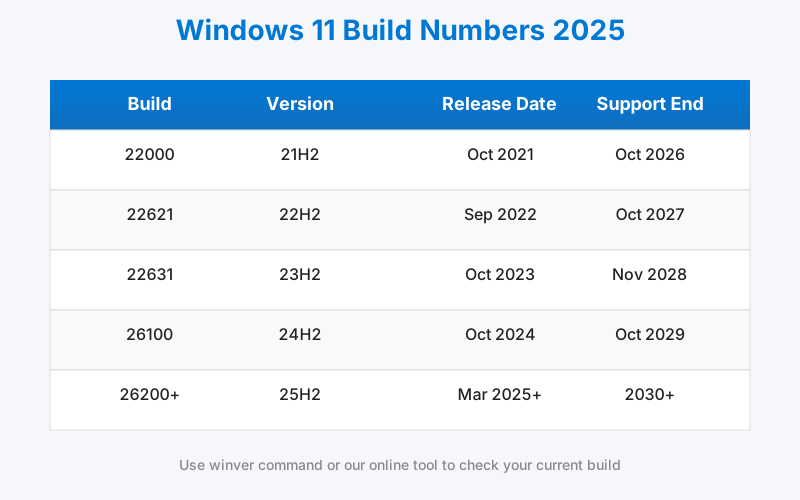
2025 Windows 11 Build Number Table
| Build | Version | Release Date |
|---|---|---|
| 22000.xxx | 21H2 | Oct 2021 |
| 22621.xxx | 22H2 | Sep 2022 |
| 22631.xxx | 23H2 | Oct 2023 |
| 26100.xxx | 24H2 | Oct 2024 |
| 26200.xxx+ | 25H2 | Mar 2025+ |
FAQ
- Q: How to know if I'm on the latest build? A: Check Windows Update or compare to the table above.
- Q: What if build doesn't match? A: You might be on Insider; join Dev Channel for 25H2.
Try our tool for instant detection.